Pages

Featured Post

Massive Warfare - Solo Battle World Record Ranking

Please update me or let me know if I have misrepresented anyone. Again, the highest solo battle kill record for the unique player will be r...

Showing posts with label tips. Show all posts

Friday, November 17, 2023

How to Transfer WhatsApp Chat from Android to iPhone (Official Free) - Needs Reset


The other day, I was helping my wife to transfer WhatsApp from Samsung Android to iPhone.
I followed this YouTube video which was super helpful (except it needs to erase and reset the iPhone if you want to do it free).

It was always stuck at Preparing...

It never proceed to start and % status of transferring until I restarted her Android mobile.

A few key points:
  • Backup WhatsApp videos/chat to a Notebook/PC and clean up - else it will take hours.

  • Restart Andriod Mobile - then it worked, at least for me.

  • Upgrade to latest iPhone firmware for that major version - e.g. mine is v16 to the latest. Even with the latest iPhone 15, upgrade to the latest major version it has e.g. 17.1


Anyway, I saw another YouTube video that it can be done without losing iPhone data.
I did not try that, so I dared not walk the talk.

From theory, it may seem to work but I do not think you can combine the WhatsApp chat from both mobiles.

Monday, October 30, 2023

Massive Warfare - Tips & Tricks


I will like to share with you some tips and tricks on the Massive Warfare controls.

This may sound trivial. However, it will help in your turning speed as if you are having a speed up paint.

Drag Sensitivity

Go to Setttings -> Drag your Drag Sensitivty to the extreme right increasing it to the maximum. This will really help you in your turning especially if you are using a tank.

Friday, January 20, 2023

Huat Pals 2023


Google Pay Huat Pals is back for its third run from 19 January 2023 to 5 February 2023!
DO NOT GIVE UP!
PERSISTENCE IS KEY


My daughter just collected the last ingot and won herself a prize!
Although, a small prize...


My wife just collected the last ingot and won herself a prize!
$11.88

I just collected the last ingot and won $11.88!


Thursday, July 14, 2022

Massive Warfare - Helicopter Strategy


Remember the previous post, I mentioned I was killed by a helicopter with manual aim homing missiles, this was how it was done in a team battle.

Cheesy tactic, but works nevertheless...


Massive Warfare - Helicopter Gameplay Tips


It was truly gracious of GR1M X66 to share his gameplay tips on Massive Warfare helicopter or chopper.

Friday, May 13, 2022

Samsung S9 black screen blue LED notification light


I was helping my wife play Shopee games to earn Shopee coins when her Samsung S9 mobile phone decided to crash on me. The game crashed and the screen turned black. When I tried to wake it up by turning on (short or long press), it did not work. No worries, I am an IT professional. Calmly, I tried to reboot by holding down volume and on/off switch for 10s. The Samsung logo came on, with the blue (pulsing) LED notification light for a while and then... the screen went black again, unable to wake it up. I started to panick a little bit, since it meant she would not be able to use the mobile the next day. Anyway, option 2 below was what made it work.


If you have the black screen on your Galaxy S9 or S9+ and you can't turn on/off (reboot) try these two easy possible solutions.
  1. Press & Hold both Volume Down and Power button at the same time until you see the Samsung logo. If no go give it a few more tries and if still no go, try option number 2.
  2. Same as option number one but this time you also want to plug in your charging cable.

Thursday, May 5, 2022

Google Opinion Rewards


I have used this App to earn some pocket money to buy Google PlayStore games and micro-transaction in games. In fact, you can purchase anything from PlayStore. If you accumlate until Christmas, usually there will be sales on games etc.

These were the games I brought last Christmas.

  1. FRAMED
  2. FRAMED 2
  3. LIMBO
  4. Lumino City
  5. Mini Metro
  6. Stardew Valley
  7. The Room: Old Sins
  8. To the Moon

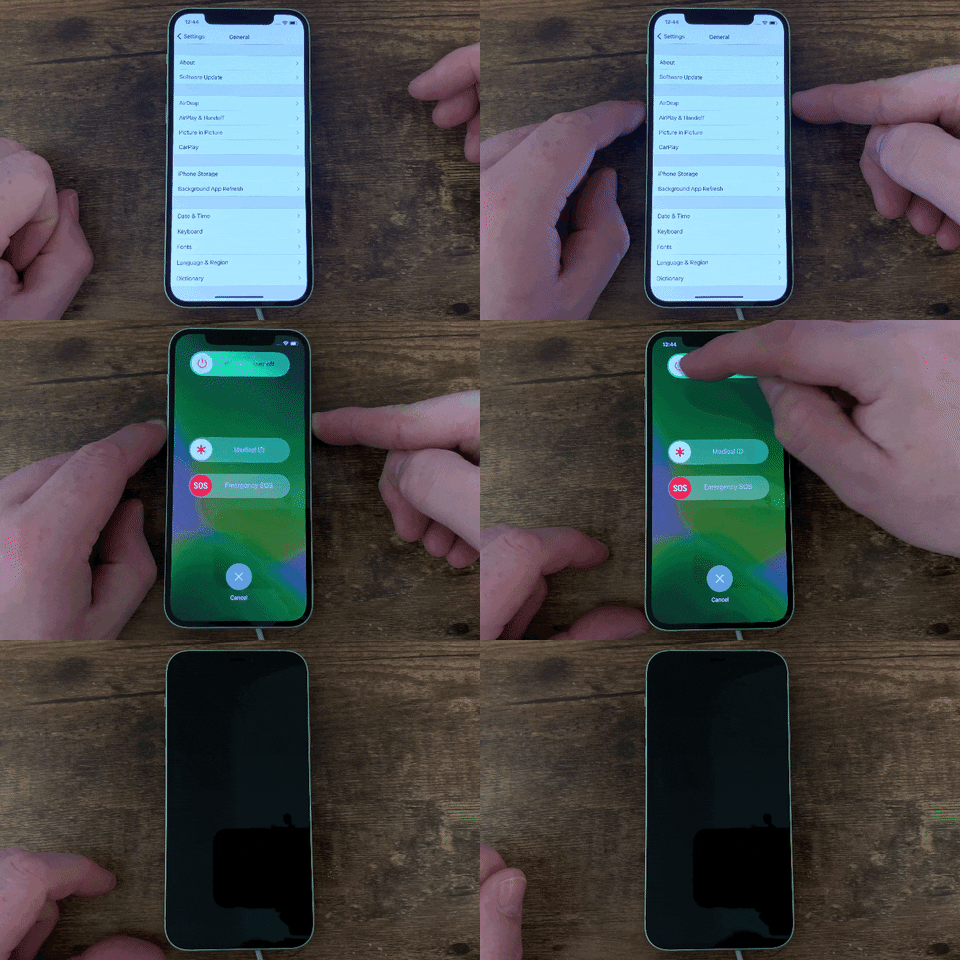
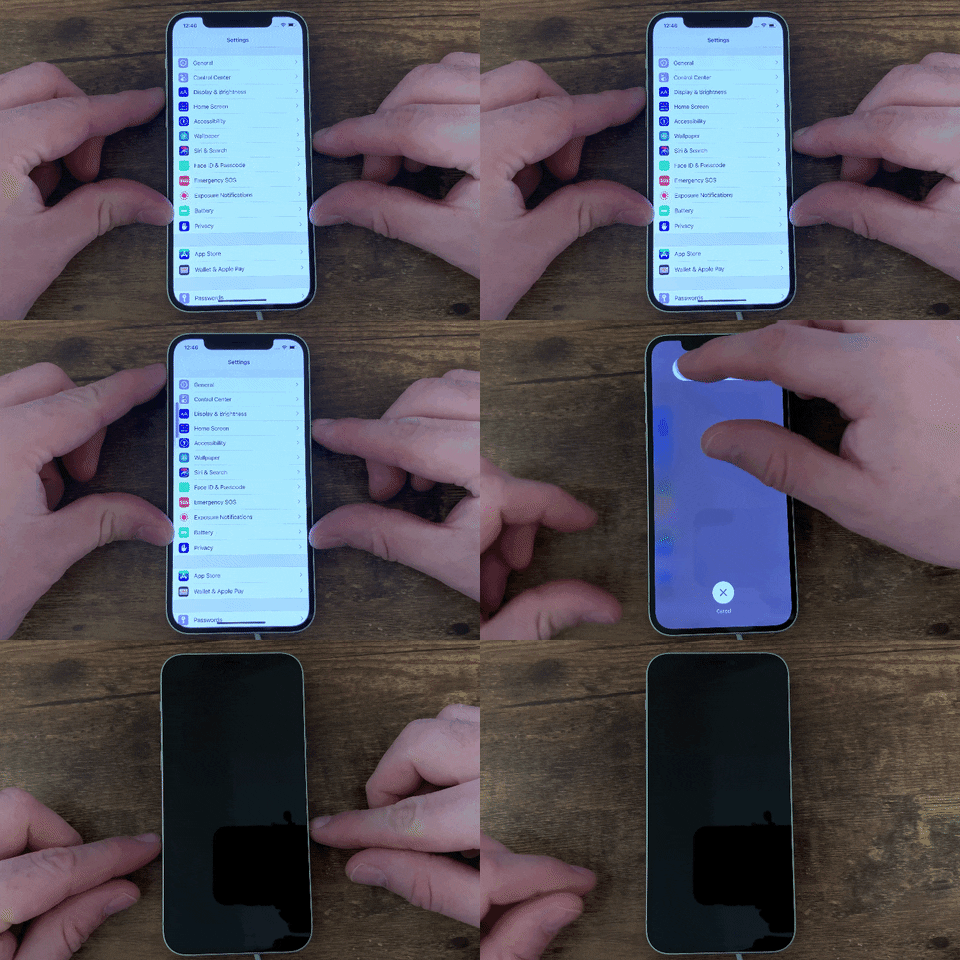
How to Shutdown and Restart iPhone 12, 12 Mini, 12 Pro, or 12 Pro Max


This may seem trivial to you. However, for a person like me who owns the first generation of iPhone 3GS (not exactly the first but the first successful model) and until recently, issued with a corporate iPhone 12 Mini, switching off the new generation iPhone has never been a challenge...

Whatever happened to just holding the on/off switch button on the top or side? Nope, the side button either puts your iPhone to sleep or wakes it up, or holding down the side button triggers Siri by default. Honestly, why Apple made such a simple action so complicated? Jesus, I need to Google just to relearn how to switch off an iPhone.

Anyway, 3 methods listed here:
  1. Buttons Method.
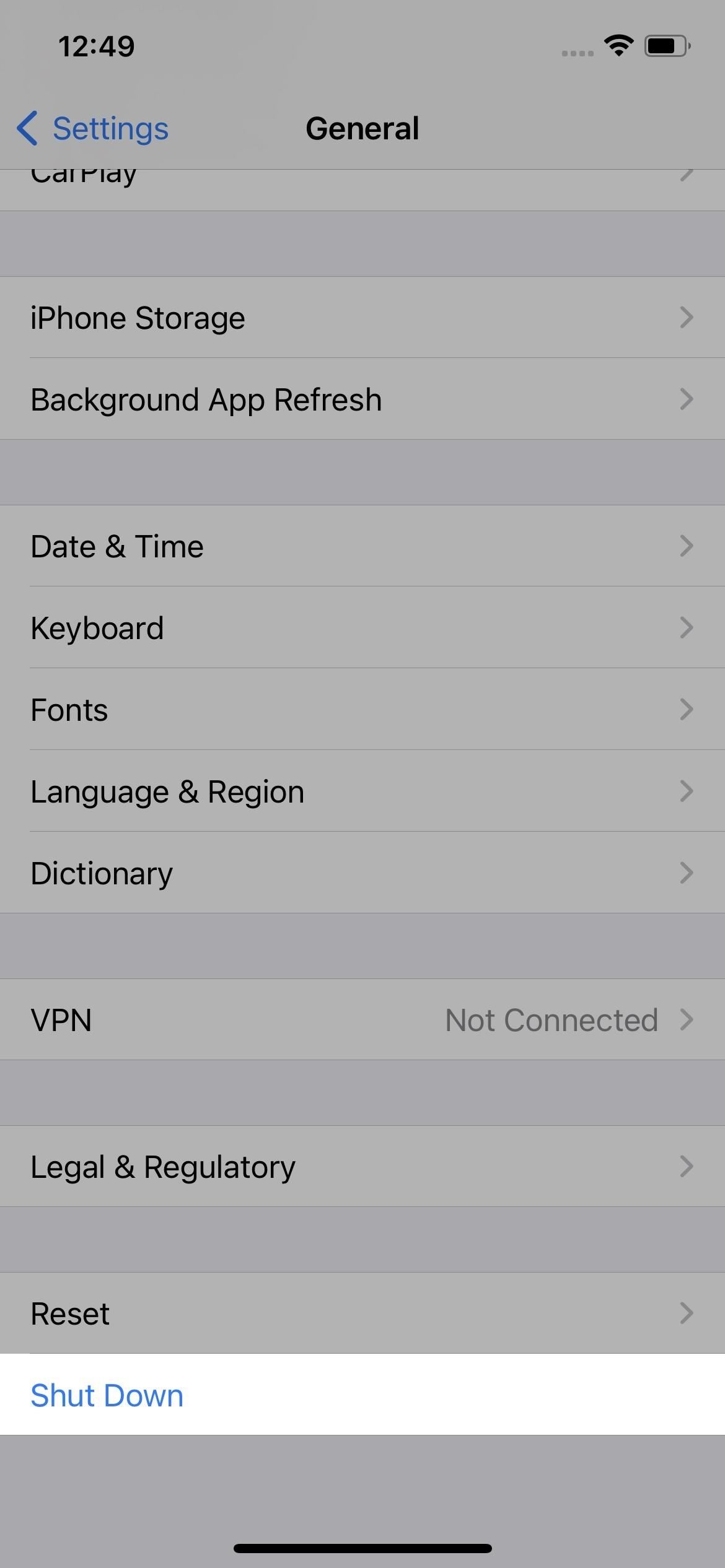
  2. Settings Menu Method
  3. AssistiveTouch Method.

1. Buttons Method

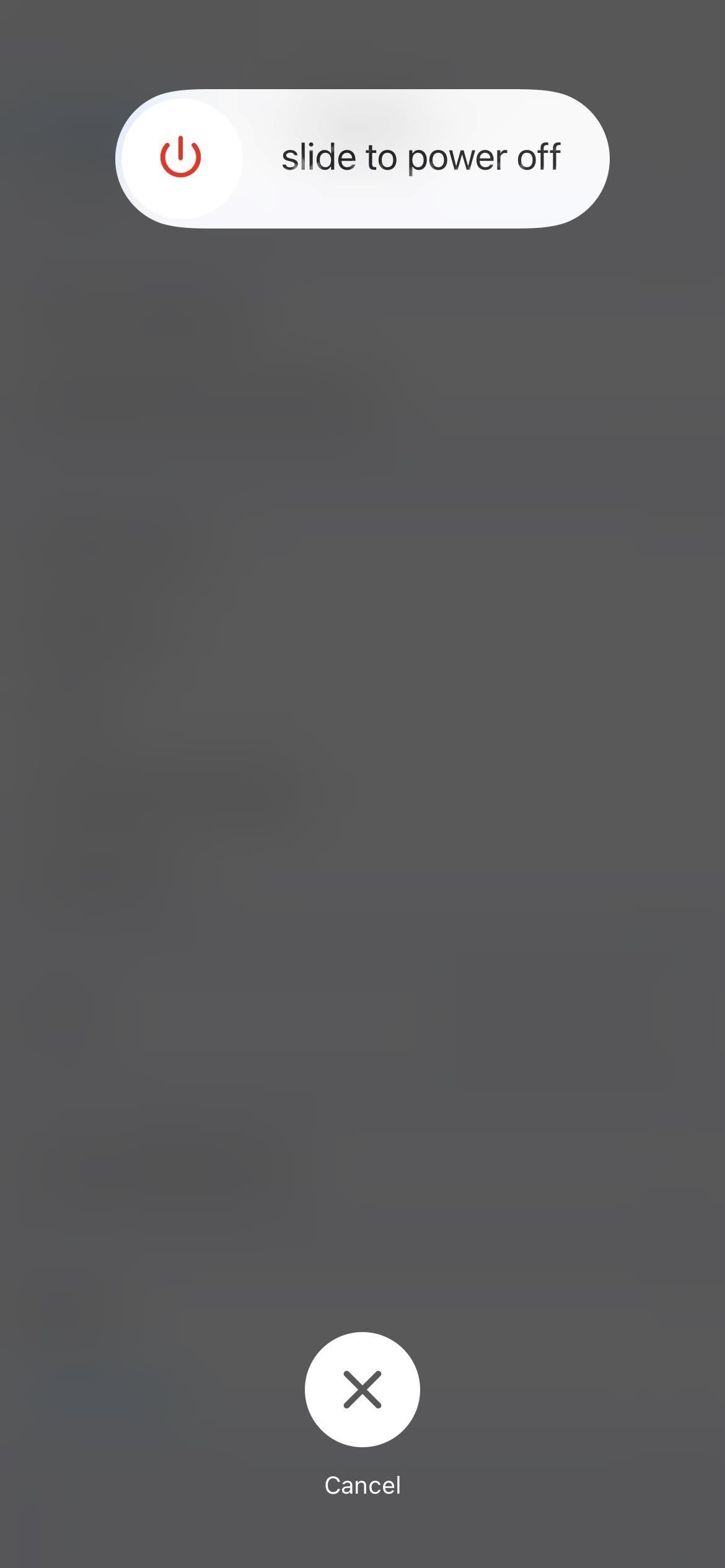
iPhone with Face ID: Simultaneously press and hold the side button and either volume button until the slider appears, then drag the Power Off slider

OR
Volume Up button > Volume Down button > Hold the side button until the slider appears, then drag the Power Off slider

2. Settings Menu Method

Go to Settings > General > Shut Down, then drag the slider.


3. AssistiveTouch Method

If you are paranoid of physical buttons getting damaged due to wear and tear, you can use Power-off/Restart Using AssistiveTouch or the digital button.
  • Settings > Accessibility > Touch > AssistiveTouch, then make sure "AssistiveTouch" is enabled.
  • Now, tap the on-screen AssistiveTouch button that appears, then tap Device > More > Restart.

Thursday, April 28, 2022

Google Map No Voice


Recently, I finally found the root cause of the Google Map no voice or not talking issue. Although I made sure that it was not muted and crank up the volume all the way, I still could not get the navigation voice. So I lived with it. However, my wife's Android phone also has the same issue, so enough is enough.

My root cause was the media volume.

1. Press up on the physical volume button.
2. Select the 3 dots (...) highlighted.

3. Slide up the media volume highlighted.
Why can't Google/Android make it such that when you push on the volume buttons, you really want to bring up/down on all the volumes.

Wednesday, March 2, 2022

Blogger image sizes


Not sure why Blogger did this?

I suspect Blogger is using CDN (Content Deilvery Network). You can no longer download or resize images.

Fret not, I am here to share with you how to resize your image. I am still investigating how to download the image.

You can on longer change the URL path to s0, s640, s800, s1024 to resize. Instead, you can append =s0, =s640, =s800, =s1024 (even odd size like =s1200) at the end of the URL to resize your images.

E.g.

Original size 

https://blogger.googleusercontent.com/img/a/AVvXsEhrmeaxCmz6khcfpleyqv5C_sti5OtZug7hLe6nzupcRMXyv6sJJA9c5B_LS6D0lRpao9rqWnKxerAf4SHTnRHFrBwCY-JkpE_vih-xFslb_QKHbEqdYVxXLvOZE5IxDnhyJIcc4tUWF57CmfzaCk0y-NySl7JGzHG9W3iTiwaDfYYPBjCA-2wv0-je=s0

Resized

https://blogger.googleusercontent.com/img/a/AVvXsEhrmeaxCmz6khcfpleyqv5C_sti5OtZug7hLe6nzupcRMXyv6sJJA9c5B_LS6D0lRpao9rqWnKxerAf4SHTnRHFrBwCY-JkpE_vih-xFslb_QKHbEqdYVxXLvOZE5IxDnhyJIcc4tUWF57CmfzaCk0y-NySl7JGzHG9W3iTiwaDfYYPBjCA-2wv0-je=s1200

Good thing though Blogger can display the original image in it's full glory.

Monday, July 24, 2017

Clash of Kings (CoK) - The West Strategy


Well, I started playing Clash of Kings - The West (CoK TW) since there is not much development on Spartania.

LevelWinner has an excellent post on the basics so I will not be duplicating it here.

I will share with you my journey as I play along and learn the secrets of the game to be a successful gamer without or minimal spending in a game. I have experience playing Haypi Kingdom, Emross Wars and Avalon Wars. So this is a similar strategy game with new tricks to learn.

The first thing to know in this type of strategy games is to know how to hide your troops from being attacked even when you are strong enough. Why, you may ask? Losing resource is fine and part and parcel of the game. Losing troops on the other hand, is a double whammy. I cannot collect resources back to build back my troops and complete the quests, let alone help the alliance. Believe me, every strategy game I played would have given you one or a few loopholes to hide your troops since everybody needed to grow. Even when you are super strong, you can be taken down by rallied troops. Why fight a disadvantaged battle in which you cannot control when you can control and win? If one weak player or similar strength attacker marches towards you, you can instantly recall your troops within 3s and decimate him. If you detect a much stronger player or rallied force marching towards you, no point banging your head against the wall and die unnecessarily. Also, beware of the deadly advance teleport of either a super strong player or a few well coordinated allied players attack. Live to fight another day or better still, find a few allies and rally against him when he is opened.

Clash of Kings Club has an excellent post on hiding your troops but I will highlight the obvious and not so obvious but effective trick.

I will post more later.

Tuesday, February 14, 2017

Real Steel WRB Video - Atom (90) vs Gold Zeus (263)


1-trick pony but needs practise and a cool head to pull it off every time. Credits to Живая сталь.
  1. Double Left (LL) - back off a distance
  2. Up Heavy (UH) - heavy punch
  3. Special - when Zeus attack
  4. Right Heavy (RH) - jump attack when Zeus just recovers from your special then LL to retreat.
  5. Down Heavy (DH) - shoulder when Zeus is quite close, use LL to retreat after that.


Thursday, September 29, 2016

Spartania: Casual Strategy Guide & Tips - Part 4


Spartania Advance Guide/Strategy/Tips - Part 4 (Offensive Upgrades)


Firstly, I would not get frustrated when I was being attacked and lost. I knew you needed the treasure chest and also you needed to complete the daily quest. Secondly, I also apologized that I attacked you a bit too often which was way over the limit of the treasure chest queue and daily quest. I will explain later.

Offensive Upgrades

Two school of thoughts for offensive upgrade. Upgrade evenly or max upgrade 1 unit then the next. I tried to upgrade evenly initially, up till about level 23 for the units. While it was effective when I won overwhelmingly since minimal troop lost, I was not really gauranteed a win when I was down to my bones i.e. archers left. While the max upgrade 1 unit method was not as beneficial as defense since the tents did not play a role in offense (surprisingly if you checked, the tents had hp), there were a few reasons and ways for doing that. Again, I like to use turtle as an example since he was so effective. These were taken a while back but his strategy did not change, just 2 more freeze spell pillars perhaps. Other offensive references included MisterE, kwasapijak and vietnam.


Wednesday, September 14, 2016

Spartania: Casual Strategy Guide & Tips - Part 3


Spartania Advance Guide/Strategy/Tips


Are you still with me and playing Spartania Casual Strategy? Great! Then, you are ready for the advanced strategies of this game.

Defensive Upgrades

My initial strategy was to upgrade my troops and buildings evenly throughout the whole camp to quickly get the most advanced unit aka the Elephant. While that was far and good, it did not stop the other players and barbarians from raiding me successfully. You see, you can use 24 units effectively in offense by deploying the troops enmass in a bunch or tactically stretching your meatshields BUT you can only "station" your defensive troops which limit your units' effectiveness to about about 8 to 10 units (including static defense) engaging at the frontline at any one time. Let's explain with an example to be clearer. These were taken a while back from turtle (but still valid), one of the leaders. There are however, many good examples of defenses like MisterE, Arya, kwasapijak, vietnam, vidock, EchoMike, kingofkings, etc.


Wednesday, August 10, 2016

Samsung Note 5 Not Charging


Samsung Note 5 Not Charging


I thought this will be the last thing that will happen to me since my Note 5 is relatively new. I had recently updated the firmware on my Samsung Note 5 smartphone and changed to standard charging. My son used my smartphone until 0% and switched off then he started charging. The screen showed the battery lightning logo and 0% battery logo. Then it flashes the battery charging lightning logo on and off. But it never got charged and remained at 0% forever although I was using the original charger. When I switched on, it would power on and before I could even set back to fast charging, it switched off again since it had 0% charge.

I wiped the Note 5 cache partition, rebooted system now and used PC to USB to charge my smartphone to about 10% before I switched on and change it to fast charging to solve the problem.

Wipe Note 5 cache partition

  • Press and hold the Volume Up and the Home buttons first, and then press and hold the Power key.
  • Keep the three buttons pressed and when ‘Samsung Galaxy Note 5’ shows, release the Power key but continue holding the other two.
  • Once the Android logo shows, release both the Volume Up and Home buttons.
  • The Android system recovery screen is shown with its options.
  • Use the Volume Down key to highlight the option ‘Wipe cache partition’ and press the Power key to select it.
  • When the process is complete, use the Volume Down key to highlight the option ‘Reboot system now’ and hit the Power key to restart the phone.
  • The reboot may take a little longer to complete but don’t worry and wait for the device to become active.

Use PC to USB to charge my smartphone to 10%. Thereafter, I could power on and change it to Fast Charging. I could use the original charger to charge after that. Hope this will help you.

Wednesday, June 8, 2016

Spartania: Casual Strategy Guide & Tips - Part 2


Spartania Offensive Strategy/Tips


If I have the chance to buy ambrosia and replay Spartania: Casual Strategy all over again, I would have done it differently. I did mention that in my previous post after reviewing the lowest level top 50 player GodIsAlive/JesusIsKing (currently level 32 / rank 26) and also Xinot20002645 who has just overtaken MisterE to be No. 1.
Update: I will review Dennsimus and pablomat who are very successful at low levels right now since the game rules have changed a bit.

Firstly, I would have spent some money to get the 2nd builder immediately. No commission for that, but kind of save you a lot of heartache, trouble and time to get that 2nd builder.

Secondly, this game favors the aggressor or attacker which I would have devoted all or most of my resources to my offensive upgrades. Why? E.g. If you pour in 3/4 of your resources to offense, you can defeat an opponent who put in 1/2 of his resources in defence, simple Maths. Of course you can argue about good defensive formation and bad offensive troop release but if the gap is too wide, you will be overrun. Also, you can get back your resources quickly by looting barbarians/players. Contrary, getting them organically from gold mines and food producers takes forever.

Let us take a look at Dennisimus offense who has reached top 50 at an impressive of only level 41.


Friday, May 20, 2016

Spartania: Casual Strategy Guide & Tips - Part 1


I am playing Spartania: Casual Strategy and it is pretty fun. It is somewhat similar to CoC except it's more like a side-scrolling 3D attack/defence game. Emily Goldring did a super job of a very comprehensive Spartania: Casual Strategy Review so I will not cover that here.

This is my current defence and it is very effective against the barbarian's attacks. So far, I have been breached perhaps fewer than 5 times (usually 2 levels higher) by the barbarians and no player has ever been successful yet.


I tried to find strategy, tips or guide online but I was in vain. So, I am here to help you. If I have the chance to restart again, I may play differently especially after reviewing the lowest level top 50 player GodIsAlive/JesusIsKing (currently level 32 / rank 26) and also Xinot20002645 who has just overtaken MisterE to be No. 1.

My initial strategy was to build a solid defence so that I could get ambrosia by successfully defending the barbarians' attacks. Since I needed 1300 ambrosia for the next builder, I could not wait passively to collect 2 ambrosia bottles that randomly appeared on top of the commander's tent. I noticed that I was attacked by the barbarians only when I was online at the defensive screen. So, I actively stayed on the defensive troop's screen as often and as long as possible to increase my chances of being attacked by barbarians. After the second builder, everybody is even game as you cannot recruit anymore.

Wednesday, March 16, 2016

Hearthstone Patch March 2016


Google Play patching that is causing the client to display pink/purple screens after patching to 4.2.

Workaround

  • Go to the app settings and select clear data and then run the app again.
OR
  • Alternatively you can just delete and reinstall the app and that should resolve the issue.

Tuesday, February 16, 2016

Hearthstone Filter by Keywords


I have already experimented successfully for the following filter keywords in case you want to construct a classic deck + previous/current year expansion/adventure.
  1. Basic
  2. Classic
  3. Nax
  4. GvG
  5. TGT
  6. LoE
  7. Lengendary
Case is not sensitive i.e. it does not matter it is upper or lower case.

Now, everyone, get in here! (oops, it's nerfed...)

Thursday, October 9, 2014

Evernote is NOT Forever


Oh my goodness. I lost my wife's data after changing her Android smartphone (not so smart after all) and I thought Evernote was forever (read all reviews before I downloaded and used it). This pretty much sums it up Please Help, I appear to have lost all 3 weeks of my notes!.

After changing her smartphone, I smirked and told myself, hey, I would not have the problem of Samsung Note 2 SNote previously where the Notes are stored locally. I happily downloaded Evernote and login with her account and like magic the Notes returned. I saw them myself before handing over the fully configured smartphone with the micro SD card backup the old smartphone's photos, plus the Google contacts I synced before changing the smartphone (see, so smart). The new smartphone was fully functional. Then, the next week, she came over with dismay telling me that all her Notes are gone!

Being the IT geek, I tried to act cool and told her not to worry. I tried to find or restore but to no avail. I Googled up further and found that it needs to be subscribed before you can read Notes offline with the smartphone or store them offline. All hope was lost and my heart sank ranting that Evernote is NOT Forever after all and I was not happily ever after.

The next day, I tried to login to the PC Chrome for one last attempt before I switched to ColorNote (good reviews and offline mode and able to save to micro SD card) and found there were 2 trash in the Evernote website after login with her account. I quickly restored them and copied the data out. So my question was I believed my wife was not IT savvy enough to delete the Notes. The deletion likely would have been caused by resetting the password and/or changing of the smartphone.

So in short, use the PC browser to login in to Evernote website to check for deleted Notes in the trash and hopefully, you can restore them.

If you ever ever use Evernote, just remember, it may just not be Forever.


Copyright © 2025 My iPhone iPad Blog. All rights reserved.

Home | About | Contact | Privacy Policy | Disclaimer